
Many users experience login issues when accessing Paglu Game. Sometimes the problem is simple, like entering an incorrect password, while other times it could be related to internet connectivity, OTP delays, server issues, or device settings. The good news is that most Paglu login problems can be fixed within minutes if you know the correct troubleshooting steps. In this guide, we’ll detail the most common Paglu login issues and their solutions so users can access their accounts safely and easily.
Common Paglu Login Problems :
Incorrect password errors
OTP not received
Website not loading
App crashing during login
Account temporarily locked
Slow login process
Invalid credentials message
Server maintenance problems
APK installation issues
Device compatibility problems
Let’s understand each issue and its fix step-by-step.
1. Incorrect Password Problem
This is one of the most common issue faced by most of the user’s on Paglu Game. This is minor mistake and can be solved very easily lets discuss what can be reason and how it can solved
Possible Reasons
Auto-fill errors
Typing mistakes
Wrong saved password
Caps Lock enabled
Forgotten password
Why these mistakes happen in Paglu Game and How can they be solved? Let’s check.
Caps Lock enabled: This is a common problem faced by users because in most mobile first-letter capslocks, users did not check and enter passwords while registering for a Paglu game account. To overcome this problem, the user need to focus while registering or user should try password in both ways with first letter uppercase and lowercase.
Note: In Paglu Game this will will never happen because it ask for re-enter password while registering for a Paglu Game account.
Auto-fill errors : In many gaming applications, when user registers an account, then password is automatically filled. In paglu Game this problem is not happen because auto-fill option is disable in Paglu Game but still user should focus while enter password.
Typing mistakes: In some cases users are in a hurry to make account because of limited time bonuses proveded by gaming platforms; because of hurry they enter wrong passwords but in Pagy Game Register bonus is permanent and this is not limited time offer the chances of this type mistake in paglu game are less.
These kind of mistakes are normal and can happen by anyone either he is experienced in this field or just new commer in gaming field. Even mistake will happen but Paglu Game
there is option for Forget Password that can allow user to change password easily and enjoy gaming experience.
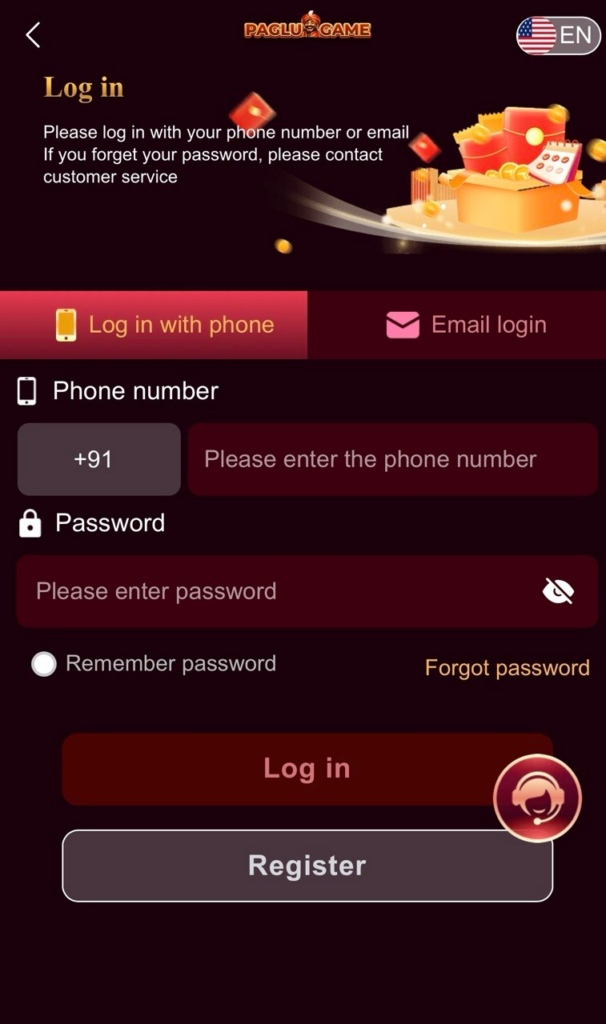
2. OTP Not Received Problem
OTP not received is another common issue faced by many users while logging into Paglu Game. Usually, this problem is temporary and can be solved easily without any technical knowledge. Many users become worried when the OTP message does not arrive instantly, but in most cases, the issue is related to the mobile network, SMS delay, or device settings. Let’s understand the possible reasons behind this problem and how users can solve it easily.
Possible Reasons
Weak mobile network
Delayed SMS service
Wrong mobile number entered
SIM card issues
Multiple OTP requests
Device SMS blocking
Temporary server delay
Now let’s discuss each problem in detail.
Weak Mobile Network
This is one of the biggest reasons why OTP messages are delayed. If the user is in an area with poor network coverage, the OTP SMS may take time to arrive. Sometimes users receive OTP messages after several minutes because of unstable mobile signals. To overcome this problem user need move where mobile signals are good or user can change networks. User can on/off; sometimes it help to run smoothly or user can connect with WiFi if available.
If there is problem with OTP then user can wait for several minutes because sometime there is delay from Paglu game backend or sometime it happen because of mobile network provider. In most cases, the OTP arrives automatically once the network becomes stable.
Delayed SMS Service: Sometimes the issue is not related to Paglu Game but to the mobile operator itself. SMS services may become slow during: Heavy traffic hours,Network maintenance, Festival or holiday seasons Because of this, OTP delivery can be delayed temporarily.
To solve this kind problem user need to show some patience and need to wait for few minutes do not click repeatly on resend SMS if there is something very urgent user can restart their mobile.
Wrong Mobile Number Entered
Many users accidentally enter the wrong mobile number during registration or login. Even a single wrong digit will prevent the OTP from reaching the correct device.
This mistake usually happens when users are creating accounts quickly.
How to Solve It
- Carefully check the entered mobile number
- Verify country code if required
- Re-enter the number slowly before requesting OTP again
In Paglu Game, users should always double-check their registered mobile number before completing account registration.
SIM Card Issues
Sometimes the SIM card itself creates problems in receiving OTP messages.
Possible reasons include:
- Inactive SIM card
- SMS service disabled
- SIM not inserted properly
- Old damaged SIM card
How to Solve It
- Reinsert the SIM card
- Check if normal SMS messages are working
- Contact your mobile operator if needed
- Restart your device
If regular SMS messages are also not working, the problem is likely from the mobile network provider.
Multiple OTP Requests
Many users repeatedly click the “Resend OTP” button because they become impatient. This can sometimes create temporary OTP blocking or delay the system further.
How to Solve It
- Request OTP only once
- Wait patiently for a few minutes
- Avoid refreshing the login page repeatedly
Paglu Game security systems may temporarily pause OTP generation if too many requests are made within a short time.
Device SMS Blocking
In some smartphones, spam filters or security applications block unknown SMS messages automatically. Because of this, OTP messages may go into:
- Spam folder
- Blocked messages
- Hidden notifications
How to Solve It
- Check spam or blocked SMS folders
- Disable unnecessary SMS blocking apps
- Allow notification permissions for messages
This problem is more common on heavily customized Android devices.
Temporary Server Delay
Sometimes Paglu Game servers may experience:
- High traffic
- Maintenance updates
- Technical issues
During these situations, OTP delivery may become slower than usual.
How to Solve It
- Wait for some time
- Try logging in later
- Check if the platform is under maintenance
Usually, these issues are temporary and fixed automatically.
3. Paglu Website Not Loading
The Paglu website not loading is another common issue many users encounter when trying to access their gaming accounts. Sometimes the website loads very slowly, while in some cases the page doesn’t load at all. This problem is usually temporary and can be easily fixed by checking the internet connection, browser settings, or device-related issues. Many users think the problem is with their account, but in reality, most website loading issues are caused by network issues or temporary server maintenance.
Let’s understand the possible causes of this problem and how users can easily fix it.
Possible Reasons
Slow internet connection
Browser cache problems
Server maintenance
Wrong website link
VPN or DNS issues
Device performance problems
Too many background applications
Temporary website traffic overload
Now let’s discuss each issue in detail
Slow Internet Connection : Good internet play vital role for run smmothly any website or app this is requirement is same for Paglu Game also. sometimes Paglu Game webist not open or working too slow this is just because of weak internet issue. If the internet speed is slow or unstable, the website may: Load partially, Keep buffering, Show blank pages and Fail to open completely. This issue is more common on weak public Wi-Fi networks or unstable mobile data connections. To avaoid this problem some intiatives can be done like Move to an area with better network coverage, Restart your router or mobile network, Switch between Wi-Fi and mobile data and Check your internet speed. A stable internet connection usually fixes the loading issue quickly.
Browser Cache Problems : Browsers store temporary files called cache files to make websites load faster. However, sometimes these old files become corrupted and cause loading problems. Beccause of this Website pages may freeze,Login buttons may not work and Website may not open properly. This problem has only one solution that is Clear your browser cache and cookies but still there is one more problem many user don’t know how to clear cache, don’t worry steps are given below
Open browser settings
Go to “Privacy & Security”
Select “Clear Browsing Data”
Clear cache and cookies
Restart the browser
After clearing cache, try opening the Paglu website again.
Server Maintenance: There are very rare chance that there is problem from Paglu Game Server side but it can happen we can not ignore this because Paglu Game also need time to time updates and fix the bugs that user’s are facing. Regarding this user can get prior notification from our official website in 2-3 days advance. this is very rare and short term problem and it have only one solution that is waiting user need to wait until this problem if user still have doubt they can visit our official website at https://paglugamelink.com/ or can contact customer support.
Wrong Website Link : Nowadays, there are many fake website create by different people many of them are not proper working. These websites are similar to Paglu Game official website. because of wrong website link many user face issue to enjoy smoothless Paglu game Features to avaoid this problem user need to join from our official website and stay away from fake website. Users should carefully check the website URL before entering login details because we have only one official site that is https://paglugamelink.com/
VPN or DNS Issues: Paglu Game is one the most popular game in the gaming world but this is limited to India only many user want’s to enjoy features of this game out of India or many people use VPN because of this Paglu Game Website will open. To enjoy Paglu Game user need to have Indian server only or avoid VPN if they want enjoy Paglu Game. There is a good news for other people if upcoming time it will release in other countries also.
APK Installation Problems
Many Paglu users install APK files manually.
However, APK installation issues are common.
Common Errors
- “App Not Installed”
- Installation blocked
- Corrupted APK file
- Unsupported Android version
Solutions
Enable Unknown Sources
Go to:
- Settings
- Security
- Allow installation from unknown sources
Download APK Again
The file may be incomplete or corrupted.
Check Android Version
Older devices may not support the latest APK version.
Security experts recommend downloading APK files only from trusted sources.
Login Page Freezing
Sometimes the login page becomes unresponsive.
Possible Causes
- Browser overload
- Device memory issues
- Poor optimization
Fixes
Close Other Tabs
Too many open tabs can slow down the browser.
Update Browser
Outdated browsers may cause compatibility issues.
Clear Cache and Cookies
This removes broken temporary files.
How to Keep Your Paglu Login Secure
Account security is one of the most important things every Paglu Game user should focus on. Many login problems and account hacking cases happen because users ignore basic security practices while using gaming platforms.
Most security risks can be avoided easily if users follow simple precautions during registration and login. Whether you are a beginner or an experienced user, protecting your Paglu login details should always be your top priority.
Let’s understand the best ways to keep your Paglu login secure and protect your account from unauthorized access.
Use a Strong Password
A strong password is the first layer of account protection. Weak passwords are easy to guess and can increase the risk of account hacking.
Many users use simple passwords like:
- 123456
- password
- mobile number
- date of birth
These passwords are very unsafe and should always be avoided.
How to Create a Strong Password
A good password should include:
- Uppercase letters
- Lowercase letters
- Numbers
- Special characters
Example of Strong Password
- Paglu@2026
- Secure#Game88
- PlaySafe@123
Users should also avoid sharing passwords with anyone.
Never Share OTP Codes
OTP (One-Time Password) is one of the most important security features in Paglu Game. OTP helps confirm account ownership during login and password reset.
Many scammers try to trick users into sharing OTP codes through:
- Fake customer support calls
- Telegram groups
- WhatsApp messages
- Social media chats
Important Safety Rule
Never share OTP with anyone under any condition.
Real support teams never ask users for OTP codes.
Sharing OTP can allow scammers to:
- Access your account
- Change your password
- Withdraw balance
- Take control of the account
Users should always keep OTP codes private and secure.
Frequently Asked Questions (FAQ)
Why is my Paglu login not working?
The issue may be caused by incorrect passwords, OTP problems, server maintenance, or internet connectivity issues.
How do I fix OTP not received problem?
Check your network signal, restart your phone, and avoid requesting multiple OTPs repeatedly.
What should I do if I forget my password?
Use the “Forgot Password” option and reset your password through OTP verification.
Why is the Paglu app crashing?
Possible reasons include outdated app versions, low storage, corrupted APK files, or device compatibility problems.
Is it safe to login using public Wi-Fi?
No. Public Wi-Fi networks may expose your account to security risks.
How can I make my Paglu account safer?
Use strong passwords, enable 2FA, avoid fake APK files, and never share OTP codes.
Final Thoughts
Paglu login problems are common, but most issues can be solved quickly with the correct troubleshooting steps. Whether the problem is related to passwords, OTP delays, app crashes, or internet connectivity, users should remain calm and follow proper security practices.
To enjoy a smoother and safer experience:
- Always use trusted login sources
- Keep your app updated
- Protect your password carefully
- Avoid suspicious links and APK files
- Monitor your account activity regularly
By following these solutions and safety tips, users can reduce login problems significantly and access Paglu Game more securely in 2026.